Planning a Microsoft Sentinel to Defender portal migration? Sentinel remains your SIEM. This guide explains the March 31, 2027 deadline and the access, detection, automation and analyst-workflow checks needed for a controlled portal transition.
Last updated: October 5, 2026 — deadline, licensing, ISOC preview and automation guidance rechecked.
Let’s fix the framing first, because much of the discussion gets it wrong – and the error matters.
Microsoft Sentinel is not being retired, and it is not being replaced by Microsoft Defender XDR. Sentinel remains a SIEM and can be used in the Defender portal with Defender XDR or on its own, including without a Microsoft 365 E5 license. What is changing is the supported operating surface. After March 31, 2027, Microsoft says Sentinel will no longer be supported in the Azure portal and will be available only in the Microsoft Defender portal. Customers still using the Azure portal experience will be redirected. (Microsoft Learn)
Organizations often search for this as a “Microsoft Sentinel migration to the Defender portal,” but that description can be misleading. Teams who hear “migration” may scope a data move and a re-platforming exercise. Teams who hear “portal change” may assume a URL swap and schedule an afternoon. Both frames miss the point. Existing Sentinel log storage remains in the Sentinel-enabled Log Analytics workspace, but the behavior around incidents, permissions, automation, connectors, APIs, and analyst workflows can change materially. Microsoft also states that, after onboarding, Defender XDR policies for data storage, processing, retention, and sharing apply in the Defender portal even when teams work with Sentinel data. (Microsoft transition guide)
A connected workspace is not the same as an operationally ready SOC.
The connection itself is straightforward. Proving that people can still detect, investigate, decide, and respond with the right access, evidence, timing, and business controls is the real project.
Sentinel portal migration deadline: March 31, 2027
Microsoft originally announced July 1, 2026, as the retirement date for the Sentinel experience in the Azure portal. In January 2026, it extended the date to March 31, 2027. Security leaders should plan against the published deadline rather than assume another extension. (Microsoft’s timeline update)
The constraint is not the number of clicks required to connect a workspace. It is the time needed to inventory dependencies, choose a sound workspace model, test representative workflows, remediate failures, update procedures, and build analyst confidence.
Microsoft supports onboarding multiple workspaces. Operationally, a phased rollout is still safer: establish a baseline, connect a representative pilot, observe a meaningful detection cycle, and expand in controlled waves. Validation is the phase teams are most tempted to compress as a deadline approaches – and it is the phase most likely to expose silent failure.
Portal transition, ISOC preview and data lake: three separate decisions
As of October 5, 2026, these paths have different prerequisites. Do not assume that a requirement for the ISOC preview also applies to an existing Sentinel workspace moving to the Defender portal.
| Decision | What to know |
|---|---|
| Existing Sentinel workspace: Defender portal transition | Connect and validate the existing Sentinel-enabled workspace. Defender XDR and Microsoft 365 E5 are not prerequisites merely to use Sentinel in the Defender portal. Microsoft transition guidance. |
| Integrated Security Operations Center (ISOC) preview | The current preview targets eligible Defender Suite, Microsoft 365 E5 or E7 customers without an active Sentinel workspace. Microsoft says to keep an existing production Sentinel workspace connected rather than disconnect it to qualify. Preview eligibility can change. Current ISOC eligibility. |
| Sentinel data lake | Evaluate onboarding, retention, region, cost and governance separately. Connecting the workspace to the Defender portal does not by itself move all workspace data into the data lake. Data-lake onboarding. |
Why this perspective matters
My experience includes leading security operations and working with cybersecurity leaders on SOC and MSSP operating models, threat detection and response, incident command, cloud defense, and operational resilience. Because my experience spans eight SIEM and two XDR platforms, I evaluate this transition through the lens of business risk and defensive outcomes – not whether a Microsoft configuration merely appears to work.
My perspective comes from having operated, built, and led at different layers of the defense system. Before joining Microsoft, I led a 15-person analyst team in a 24/7 MSSP environment, where continuous coverage, SLA performance, escalation discipline, and analyst readiness were daily operating requirements.
During nearly 15 years at Microsoft, I worked at the intersection of frontline cyber defense, large-scale security operations, and security-product development. I led the effort to build, train, and mentor a 10-person Tier 1 SOC analyst team, providing operational oversight for continuous coverage. I also conducted ISO/IEC 27001 audits as part of broader security governance and assurance responsibilities. As a member of the founding team for the Microsoft Threat Intelligence Center (MSTIC), I investigated cybercriminal groups and advanced persistent threat (APT) actors and campaigns, translating complex findings into actionable threat intelligence. I helped develop early Linux threat detections for Azure Security Center, now Microsoft Defender for Cloud; contributed to Microsoft Sentinel during its early product development by building advanced detections and multi-source correlations for scenarios including business email compromise (BEC), ransomware, insider threats, and data exfiltration; and later led a detection engineering team focused on cross-domain, end-to-end attack detection and disruption in Microsoft Defender XDR.
My work has also included Microsoft Security Copilot and AI-enabled security operations. Across these roles, the focus has been helping teams detect, investigate, contain and disrupt advanced attacks.
This breadth of experience – spanning MSSP operations, threat investigation, SOC capability building, security-product development, AI-enabled defense, and advising security leaders in previous roles – allows me to evaluate platform changes across the complete detection-and-response lifecycle, from telemetry and product schemas to detection logic, incident correlation, analyst workflow, automation, decision rights, and executive risk acceptance, rather than treating them merely as technical configuration exercises. I look especially for failures that rarely appear on a deployment status screen: weakened coverage, changed incident behavior, overbroad automation, broken integrations, unclear ownership, and workflows that fail under pressure. A transition is ready for production only when the organization can detect, investigate, decide, contain, recover, and demonstrate those outcomes with reliable evidence.
Although this guide focuses on Microsoft Sentinel, the operating principles behind it – telemetry integrity, access governance, detection validation, automation assurance, incident command, controlled change, and measurable acceptance criteria – apply across SIEM, XDR, EDR, cloud, enterprise SOC, and MSSP environments regardless of vendor. All technical product-behavior statements below are based on public Microsoft documentation; no confidential product information is used.
What changes – and what broadly continues
The visible change is a different portal. The material change is how people, content, and integrations interact with the platform.
What changes when Sentinel moves to the Defender portal
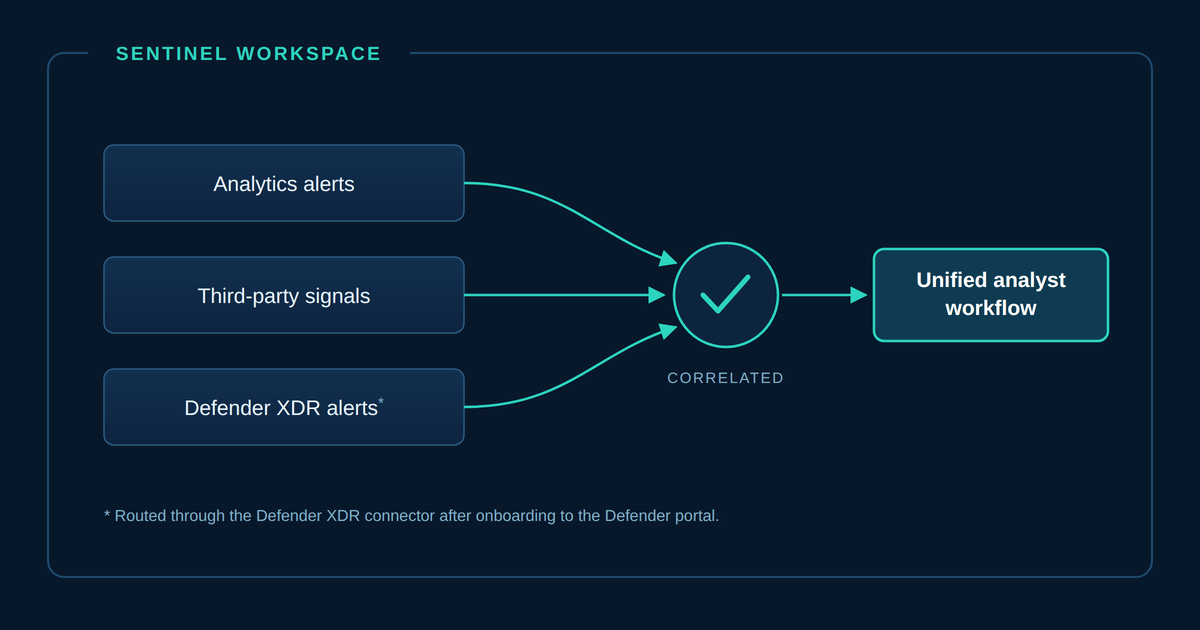
The Sentinel workspace and log foundation continue. Alert routing, incident behavior, automation and analyst workflows still need validation.
Before: separate operating surfaces
Sentinel path
- Sentinel analytics alerts
- Sentinel incident queue
- Azure portal
Defender XDR path, if enabled
- Defender XDR alerts
- Defender XDR incident queue
- Defender portal
After: the Defender portal
Incoming alerts
- Sentinel analytics alerts
- Defender XDR alerts, if enabled
- Third-party alerts through Sentinel
- Defender XDR correlation and incident engine
- Unified incident queue when Defender XDR is enabled
- Defender portal
- SOC analysts using a unified operating workflow
What continues
- Sentinel-enabled Log Analytics workspace
- Existing log data, KQL queries and functions
- Non-Microsoft data connectors
- Sentinel analytics and automation content
Content persists; test its behavior in the new operating model.
What to validate
- Microsoft-product alert routing
- Incident creation and correlation
- Automation rules and playbooks
- APIs and ticketing integrations
- Analyst access and procedures
Sentinel can operate in the Defender portal without Defender XDR or E5. In that case, integrated pages display Sentinel data only.
| Broadly continues | Requires deliberate validation |
|---|---|
| Sentinel-enabled Log Analytics workspace and existing log data | Primary and secondary workspace design |
| Core KQL queries, functions, analytics rules, hunting, and workbooks | Microsoft-product alert routing, schema, and duplicate paths |
| Existing Azure RBAC access to Sentinel features | Least-privilege personas and any separately activated Unified RBAC or Sentinel scoping |
| Non-Microsoft data connectors | Incident creation, grouping, correlation, and merging |
| Logic Apps-based playbooks and automation content | Triggers, conditions, permissions, synchronization, and timing |
| Existing Sentinel consumption billing | API payloads, ITSM fields, URLs, and case synchronization |
“Available” does not mean “operationally identical.” Behaviors teams have built process around can change without announcing themselves.
Six Sentinel migration readiness checks
1. Map tenant and workspace topology first
Document every Sentinel workspace, its tenant and subscription, the teams that use it, the data it receives, and the business purpose it serves. Do not choose the primary workspace by convenience alone.
The Defender portal supports one primary workspace and multiple secondary workspaces in a tenant. When Defender XDR is enabled, Defender incidents and alerts synchronize with the primary workspace, and only alerts from that primary workspace are correlated with Defender XDR data. Secondary workspaces continue operating, but they do not have identical correlation or feature behavior. Some capabilities, including certain custom-detection and API scenarios, are limited to the primary workspace. (Microsoft multi-workspace guidance)
During onboarding, the Defender XDR incident-and-alert connector attaches to the primary workspace. Microsoft documents that standalone connectors for Defender for Endpoint, Defender for Identity, Defender for Office 365, Defender for Cloud Apps, and Entra ID Protection are disconnected in secondary workspaces. Non-Microsoft connectors continue operating. Content in secondary workspaces that depends on those Microsoft connector paths may therefore need remediation or separate Defender table-data configuration. (Microsoft multi-workspace guidance)
Primary and secondary workspace behavior
Only the primary Sentinel workspace receives the Defender XDR connector path. Review secondary-workspace connectors and dependent content separately.
Primary connection path
- Microsoft Defender services and alerts
- Defender XDR connector
- Primary Sentinel workspace
- Defender portal operating surface
Secondary workspace A
Affected connectors disconnected
Affected Microsoft-product connectors are disconnected during onboarding.
Continue
Existing third-party ingestion continues through the Sentinel workspace.
Review
Remediate content that assumes a disconnected Microsoft connector or alert path.
Secondary workspace B
Affected connectors disconnected
Affected Microsoft-product connectors are disconnected during onboarding.
Continue
Existing third-party ingestion continues through the Sentinel workspace.
Review
Remediate content that assumes a disconnected Microsoft connector or alert path.
Separate table-data option
Selected Defender table data can be configured separately for a secondary workspace. This does not create the primary connector path.
Sentinel can operate in the Defender portal without Defender XDR. In that case, integrated pages display Sentinel data only.
For each workspace, record cross-workspace queries, Defender-table dependencies, business-critical workbooks, automation, delegated administration, residency requirements, and the rationale for primary-workspace selection.
2. Validate identity and access by persona
Connecting Sentinel to the Defender portal does not automatically replace Azure RBAC. Existing Azure RBAC permissions continue to provide access to Sentinel features. Organizations can separately activate Microsoft Defender Unified RBAC for selected Sentinel workspaces; once activated, Sentinel permissions in the Defender portal should be managed through that model. Some permissions related to workbooks, playbooks, and Azure resources remain Azure-managed. (Microsoft Unified RBAC guidance)
Portal access is not a useful acceptance test when performed only by an owner or global administrator. Test real, least-privilege personas:
- Tier 1 analyst: view, assign, comment, add tasks, and escalate
- Tier 2 responder: investigate entities, change incident state, and invoke approved actions
- Threat hunter: query required workspaces and use approved functions
- Detection engineer: create and update analytics within scope
- Automation owner: manage rules and execute permitted playbooks
- Auditor or stakeholder: view only the evidence and metrics appropriate to the role
Test both what each persona should be able to do and what it must not be able to do. Include service principals, managed identities, Logic Apps permissions, and emergency access.
Microsoft also documents that onboarding assigns the Microsoft Sentinel Contributor role to the Microsoft Threat Protection and WindowsDefenderATP applications in the subscription. Record those expected assignments in the change record and make sure access-review teams understand them. (Microsoft transition guide)
If the SOC uses UEBA or IdentityInfo, test that path separately. The native Defender IdentityInfo table does not support the former Sentinel table-level RBAC restriction. Microsoft Sentinel scoping can provide row-level access only for supported Sentinel tables and requires Sentinel to be enabled in Unified RBAC. It does not restore table-level RBAC to the native Defender IdentityInfo table, and XDR tables are not supported for Sentinel scoping. (Microsoft Sentinel scoping)
3. Inventory connector paths and schema dependencies
The most dangerous connector problem is not always a red status icon. It can be a healthy-looking environment that changes routing, produces duplicates, or quietly starves content of fields it expects.
Microsoft documents schema differences for Microsoft security alerts routed through Defender XDR, including differences in field mappings, nesting, source information, and scope. Those differences can affect queries, analytics rules, workbooks, and automation even when the source product has not changed. (Microsoft alert-schema guidance)
Build a dependency inventory that connects each source to its destination table, expected volume, freshness threshold, parsers, analytics, workbooks, automation, APIs, ITSM mappings, and owner. Then test a representative event through the complete chain. A query returning rows proves ingestion; it does not prove the response workflow still works.
4. Test detections and incident semantics together
Correlation ownership moves. Sentinel analytics rules remain available, but when Defender XDR is enabled, the Defender XDR correlation engine governs incident correlation and merging after onboarding. Fusion is disabled because Defender correlation replaces it. Analytics rules configured to generate alerts without incidents continue to run, but those alerts are not visible in the Defender portal. Microsoft security incident-creation rules are deactivated to avoid duplicates. (Microsoft transition guide)
Existing incident titles can change when correlation merges or reshapes incidents. Anything downstream that depends on an exact title becomes brittle. Microsoft recommends using the analytics-rule name and, where needed, tags rather than the incident title as automation criteria.
For every priority use case, validate the full outcome:
- The test event reaches the expected table with usable fields.
- The scheduled, near-real-time, or custom detection runs as intended.
- Entity mappings provide the context analysts need.
- The alert is visible in the expected experience.
- Incident creation, grouping, merging, severity, and ownership are acceptable.
- The analyst and downstream systems can complete the intended response.
A successful rule execution is only the beginning of the test.
5. Treat automation and integrations as security controls
Automation is where “it still works” and “it works the same” diverge most.
Audit incident-provider conditions first
After onboarding, the Incident provider condition is removed because incidents use Microsoft XDR as the provider. Microsoft states that existing incident-triggered automation rules can then run against both Sentinel and Defender XDR incidents, including rules that were previously restricted by provider. (Microsoft automation guidance)
Operationally, this behaves like a fail-open scope change: automation may execute against a broader incident population than its designers intended. If a rule disables accounts, isolates devices, blocks addresses, or modifies tickets, treat this as a security-control change – not routine configuration hygiene. Microsoft recommends using an Analytic rule name condition tied to a Sentinel-only analytics rule when Sentinel-specific scoping is required.
Worked test example — proposed, not a reported production result. Suppose a playbook is intended only for incidents from one Sentinel analytics rule. In a controlled pilot, trigger one incident from that rule and a second incident outside its approved scope. The expected result is that only the in-scope incident invokes the playbook and only the approved test target is affected. Record the automation condition, incident and rule identifiers, service identity, run history and target-system logs. A successful in-scope run without the out-of-scope test is incomplete evidence. Retest after onboarding and any rule or permission change.
Test fields and downstream outcomes, not status codes
After onboarding, SecurityIncident.Description is no longer available. A description-based incident-creation condition can stop working, while an external ticketing integration such as ServiceNow can continue creating tickets with the expected description missing. Nothing necessarily throws an obvious error. Read the resulting ticket; an HTTP 200 tells you very little about whether the workflow produced the right business outcome.
For unified incidents and alerts, Microsoft recommends Microsoft Graph REST API v1.0. The Sentinel SecurityInsights API continues to support Sentinel resources, but incident consumers may require changes. Among the documented differences:
providerNamechanges fromAzure SentineltoMicrosoft XDR.providerIncidentUrlis added whileincidentUrlremains.alertProductNamesrequires?$expand=alerts.serviceSource,detectionSource, andproductNamebecome available.- Incidents created through the Sentinel API, Logic Apps, or manually in Azure do not synchronize to the Defender portal.
Keep three timing behaviors separate
- Defender incidents can take up to five minutes to appear in Sentinel, delaying incident-triggered playbooks.
- Multiple changes to one incident within a 5–10-minute period can be consolidated into one update, so intermediate states may be lost.
- It can take up to 10 minutes from an alert triggering and an incident being created or updated in Defender until a Sentinel automation rule runs.
Design tests for trigger scope, service identity, permissions, input fields, null handling, retries, idempotency, human approval, ticket synchronization, and observable evidence that the action completed.
Do not validate a playbook by pressing “Run” in isolation. Test the complete chain:
Representative event -> detection -> alert -> incident -> automation rule -> playbook -> external action -> ticket and evidence update
6. Rehearse the analyst operating model
The unified queue is not simply the old incident list in a new location. Incidents can contain alerts across security domains, broader entity context, and a different correlation model. That can improve the attack story, but it also changes triage, ownership, escalation, and handoff.
This is the cost nobody scopes. Every runbook, SOP, onboarding document, or training deck that says “in the Azure portal, navigate to…” needs review. Rewrite procedures during the pilot while the current and target experiences can still be compared. Treat analyst confidence as a go/no-go criterion, not a nice-to-have.
Test whether analysts can claim an incident from the correct workspace, interpret a merged cross-domain story, identify the detection source, execute an approved response, preserve evidence, synchronize the case, hand it off across shifts, and close it with the required reason.
Measure time to assignment, time to meaningful triage, automation latency, ticket-sync success, permission failures, rework, and duplicate-case rates. A technically available portal can still produce a slower SOC if the people and procedures are not ready.
Also review hunting and data workflows. Existing KQL, functions, and Log Analytics tables continue, but not every workflow is portable without adjustment. Bookmarks are not available in Advanced Hunting, Workspace Manager is not available in the Defender portal, and Advanced Hunting uses a unified IdentityInfo schema that differs from the Log Analytics version. Organizations with customer-managed-key requirements must also review Microsoft’s documented change: existing Log Analytics data and Sentinel content can remain CMK-encrypted, while alerts and incidents are no longer CMK-encrypted after onboarding. (Microsoft transition guide)
What teams gain – and what remains conditional
The Defender portal is Microsoft’s primary operating and innovation surface for Sentinel. Depending on the services and licenses enabled, teams can gain a unified incident queue, cross-domain correlation, consolidated entity context, attack-story visualization, advanced hunting, case-management capabilities, and access to newer Sentinel experiences.
Those benefits should not be presented as universal. Sentinel can operate in the Defender portal without Defender XDR or E5, but combined SIEM/XDR correlation requires Defender XDR. Security Copilot, automatic attack disruption, Exposure Management, and other capabilities have their own licensing, permission, service, capacity, or regional requirements. The portal transition itself carries no extra Microsoft charge; existing Sentinel consumption continues to be billed as usual. (Microsoft portal comparison, Microsoft transition guide)
Treat the move as an opportunity to improve operations, not as proof that every advertised capability belongs in the transition scope.
A controlled migration and transition sequence
The failure mode I expect is not a dramatic cutover failure. It is a connection that appears successful, followed by degraded detection or automation that nobody attributes to the transition. Design validation before onboarding, not after.
Connect a pilot. Validate the behavior. Then scale.
Follow the six phases in order. Advance through each gate with recorded evidence.
1Baseline
- Inventory tenants, workspaces, connectors and content
- Capture ingestion and detection baselines
- Record incident, automation and integration behavior
- Assign technical and operational owners
Gate: Current state documented
2Design
- Choose the primary and secondary workspace model
- Select a representative pilot
- Map access and separation of duties
- Define pass/fail acceptance criteria
Gate: Pilot approved
3Prepare
- Resolve duplicate alert paths
- Correct automation and API dependencies
- Verify roles and playbook permissions
- Prepare test events and analyst procedures
Gate: Change window authorized
4Connect the pilot
- Open the Defender portal
- Go to System → Settings → Microsoft Sentinel
- Connect a workspace
- Select primary → Review → Connect
Gate: Connection completed
5Validate real operating behavior
Check data, detections and incidents, response and integration, and analyst operations.
Open the four validation checklists
A · Data
- Ingestion freshness
- Expected tables and queries
- Connector health
- Missing or duplicate alert paths
B · Detections and incidents
- Known-event detection
- Analytics-rule execution
- Incident creation and correlation
- Severity, title, provider and grouping
C · Response and integration
- Automation-rule execution
- Playbook permissions and actions
- Ticketing and SOAR synchronization
- API fields, URLs and timing
D · Analyst operations
- Queue visibility and assignment
- Comments, tasks and escalation
- Hunting and entity workflows
- Runbook usability and access
Are the acceptance criteria met?
Assign the failed test, remediate the dependency and rerun affected tests. Return to Phase 5: Validate.
Use the accepted evidence to approve the rollout.
Use a controlled disconnect where required, then return to Phase 3: Prepare.
6Operationalize and scale
- Approve evidence
- Update runbooks
- Train analysts
- Schedule remaining workspaces
- Monitor drift and connector health
Milestone: Azure portal support ends after March 31, 2027.
Microsoft supports disconnecting a workspace. If the Defender XDR connector was configured, disconnecting also disconnects that connector. Reconnect it when returning to the Azure portal before the support deadline.
1. Baseline
Inventory tenants, workspaces, connectors, analytics, functions, workbooks, automation, APIs, and downstream case systems. Capture current ingestion freshness, alert volume, incident behavior, ticket output, and automation timing. You cannot detect regression against a baseline you never took.
2. Design
Choose the primary and secondary workspace model, target access model, connector routing, analyst personas, and separation-of-duty requirements. Define pass/fail criteria and select a representative pilot – not merely the smallest workspace.
3. Prepare
Audit incident-provider conditions first. Resolve known duplicate alert paths, brittle title or schema dependencies, playbook permissions, and API assumptions. Prepare approved test events, named owners, a change window, and stop criteria.
4. Connect the pilot
Follow Microsoft’s current onboarding procedure, confirm the intended primary workspace, and record every configuration change. Treat a successful connection as the start of validation, not the end of the project. (Microsoft onboarding guide)
5. Validate real operating behavior
Test data, detections, incidents, automation, APIs, ITSM integration, and analyst procedures end to end. Read the resulting ticket. Inspect the incident. Confirm the action. Record expected result, actual result, evidence, severity, owner, and disposition.
6. Operationalize and scale
Approve the evidence, remediate failures, update runbooks, train the wider team, and expand in controlled waves. Monitor drift, connector health, access exceptions, incident volume, correlation changes, and failed automation after each wave.
If rollback is part of the plan, test it. Microsoft supports offboarding, but if the Defender XDR connector is configured, offboarding also disconnects it. Microsoft does not describe offboarding as an automatic restoration of every configuration changed during onboarding. Revalidate connector flow, incident behavior, automation, and integrations after any offboarding action. (Microsoft offboarding guidance)
And name owners. A checklist without an owner is a list of things everyone assumed someone else did.
Minimum evidence for a go/no-go decision
| Owner or persona | Scenario | Evidence of readiness |
|---|---|---|
| SOC analyst | Triage, assign, investigate, and escalate a representative incident | Correct queue, ownership, task, evidence, and escalation behavior |
| Detection engineer | Generate an approved event for a priority use case | Expected data, rule execution, entities, alert, and incident outcome |
| Incident responder | Execute an approved containment workflow | Authorized action, correct target, successful execution, and reviewable evidence |
| Automation owner | Trigger a playbook and ITSM update | Correct input, scope, permissions, timing, retry, and field mapping |
| Security architect | Compare primary and secondary workspace behavior | Expected visibility, connector routing, correlation, and feature scope |
| Identity owner | Test least-privilege personas and service identities | Required tasks succeed; prohibited tasks remain blocked |
| SOC manager | Complete shift handoff and executive update | Consistent ownership, timeline, status, and operational metrics |
The decision to scale should be owned by the security operations leader, not inferred from the absence of an obvious error message.
Minimum readiness checklist
- Executive sponsor, technical owner, operational owner, and go/no-go authority are named.
- In-scope tenants, subscriptions, workspaces, business services, and downstream integrations are documented.
- Primary and secondary workspace decisions are approved.
- Azure RBAC, any Unified RBAC plan, service identities, and least-privilege personas are tested.
- Microsoft-product connector changes, duplicate routes, and schema dependencies are resolved.
- Priority detections pass with representative events and acceptable incident outcomes.
- Incident-provider, title,
Description, and other brittle automation conditions are remediated. - Playbooks, Logic Apps, APIs, webhooks, notifications, and ITSM synchronization pass end to end.
- Privacy, residency, retention, CMK, and licensing implications are approved.
- Analysts complete scenario-based testing with updated runbooks.
- Exceptions have owners, risk decisions, and target dates.
- Evidence is retained in the approved system of record before wider rollout.
None of this is exotic. It is ordinary operational diligence applied to a change that is easy to underestimate precisely because the product name does not change.
Frequently asked questions
Is Microsoft Sentinel being retired?
No. The Sentinel experience in the Azure portal is being retired. Microsoft says Sentinel will be available through the Defender portal and will no longer be supported in the Azure portal after March 31, 2027. (Microsoft Learn)
Is this a data migration?
Not in the usual sense. Microsoft’s process connects an existing Sentinel-enabled Log Analytics workspace to the Defender portal; it does not copy the entire workspace into a replacement SIEM. Data handling and feature behavior still require review.
Is Defender XDR or Microsoft 365 E5 required?
Not merely to use Sentinel in the Defender portal. Features that depend on Defender XDR, Security Copilot, or other licensed services require their applicable licenses and prerequisites.
Does the transition add cost?
Microsoft says the portal transition itself adds no extra charge. Existing Sentinel consumption continues to be billed as usual. Optional services, additional ingestion, data-lake choices, or separately licensed capabilities can affect total cost.
Does connecting Sentinel automatically move data into the Sentinel data lake?
No. Defender-portal workspace connection and Sentinel data-lake onboarding are separate processes. Treat the data lake as a separate architecture, region, retention, billing, and governance decision unless it is explicitly included in scope. (Microsoft data-lake onboarding)
The lesson beyond one platform
The configurations in this guide are specific to Microsoft Sentinel and Defender XDR. The operating discipline is not. Any significant SIEM, XDR, EDR, cloud-security, automation, or case-management change can affect telemetry flow, access, correlation, evidence, and analyst decisions. Mature security organizations validate the end-to-end outcome across people, process, technology, and governance – not simply whether a new interface is available. This applies equally to enterprise SOCs, MSSPs, and mixed-vendor environments where platform change must preserve detection coverage, response authority, integration reliability, and operational resilience.
The leadership question
The wrong question is:
“Can we open Sentinel in the Defender portal?”
The right question is:
“Can our people detect, investigate, decide, and respond through the Defender portal with the access, evidence, timing, and business controls we require?”
That is a higher standard. It is also the standard that matters when the next high-severity incident arrives.
Strengthening the transition and the operating model behind it
A transition plan should identify the systems and workflows affected, prioritize the operational impact, and define validation criteria and accountable owners for each phase.
Related insights
- Cyber Incident Commander Toolkit: Decision Rights Under Pressure
- Explore more cybersecurity research and insights
Technical-use disclaimer: This article is provided for general informational and educational purposes only. It does not constitute legal, compliance, or environment-specific cybersecurity advice. Product capabilities, licensing, interfaces, and requirements may change. Before making production changes, verify current vendor documentation, test in a controlled environment, maintain appropriate backups and rollback procedures, and obtain required technical, legal, and business approvals. Organizations remain responsible for evaluating and implementing changes within their own environments. This is an independent article and is not affiliated with or endorsed by Microsoft.